

AI visual tools are now a part of daily business. They are used by marketers to create graphics for campaigns, by shop owners for product pages, and by regular users to try out looks they wouldn’t have time to take photos of. Vidnoz has developed a free, online toolkit based on this concept, including two of their image tools: a text and image-based picture maker and a virtual outfit swapper.
Vidnoz AI Image Generator: Transform your concepts into imagery in no time
The AI image generator was created for individuals with an idea but not the design expertise. It has two primary operating modes. Text to image mode: You type in the description of a scene and it is drawn. When you’re in the image to image mode, you upload an image and you tell it how to modify it; it will take a picture and modify what it is. One-click changes are also available by the Photo Effects option that includes popular looks like Peanuts-style cartoon, vintage mood, 3D cartoon and 50’s retro illustration.
What stands out
No registration and no cost to use. It doesn’t require an account to be able to test the tool and to create images online. There are daily generations limited on the free plan, and additional features like higher resolution or more uses are behind a paid tier.
Multiple leading AI models. It does not force you to use a specific engine, but allows you to choose from popular image models such as Flux Dev, Google Nano Banana, Nano Banana Pro, Google Image 4, Z-Image and Qwen. Various models differ in their approach to realism, illustration and text – it’s useful to be able to swap between them.
Control of the product. The aspect ratio, the number of images produced at a time, and comparisons of different variations of a single prompt are all available. This will make it easy to use in your social posts, YouTube thumbnails, posters and web banners without having to crop later on.
Unwanted element filtering. The negative prompt field allows you to include what you don’t want in the image, producing cleaner images that are closer to the original image.
How it works
There are three steps to the process. Type in a prompt or upload an image. Second, pick a style and set the parameters such as ratio, number of images and elements to exclude. Thirdly, click on Generate Now, and wait for the result.
Vidnoz AI Clothes Changer: Shop Any Clothes Without a Clothing Room!
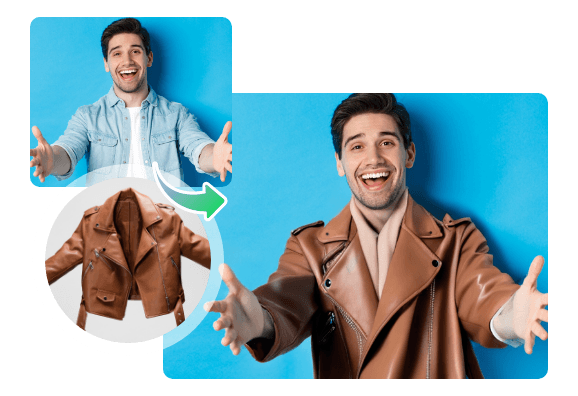
The second tool is the AI clothes changer that changes the clothes in a photo without having to cut, paste or mask them. Upload a photo of a person, select the clothes to change, and the AI will add them to the image while adjusting them to the person’s body shape and pose.
What stands out
- Flexible clothing areas. You can replace just the top, shorts, pants or just a short skirt, long skirt or do it all at once.
- There are two methods to choose new clothes. Select from the virtual closet styles, or upload your own photo of clothes to see exactly how a real piece of clothing would appear.
- Natural-looking results. The tool calculates the body type and posture to ensure that the new outfit fits the user in the picture and isn’t stuffed inside.
- The ability to choose between scene and size options. It’s possible to choose a target scene, like a white studio background, and an output size of 2000 x 2000, which is ideal for marketplaces like Amazon, Shopify, eBay and Etsy.
- Works in a browser. No installation required and works on phone or computer. No login is required to try (but a free account is necessary to download the completed photo).
How it works
Submit a clear, front and center picture of the body, which is not blocked. Then select the section to transform and select a style from the closet, or upload an image of a garment. Lastly, click on the Change Now option and you’ll see the new look in no time. Ideally, don’t take profile shots, low-light or photos with a person holding something.
Who it suits
- E-cambers can look for styles prior to buying them.
- Fashion retailers could demonstrate one article on multiple models which will help them save the expense of repeating photoshoots.
- A professional headshot outfit is a photographable outfit for a CV or profile picture that can be prepared by the professional without hiring a photographer to shoot the pictures.
Strengths and Limitations
Advantages: both tools are easy to use, require no technical knowledge and are browser based. Its selection of a few AI models and the nuances of its control panels makes it more detailed than most free image-makers, while its outfit tool includes items as well as looks, and customization of clothing is supported (for uploads).
Restrictions: The free plan imposes daily usage restrictions and also premium features like higher resolution and faster generation require a paid plan. Like all AI image generators, output varies based on the quality of the input, so it’s important to provide a clear image and a detailed prompt. It’s important for users to also avoid the use of images that seem to belong to a brand, a celebrity and protected artistic style and adhere to the platform’s terms of use.
Final Verdict
These two tools combine to make Vidnoz a convenient creative toolbox. The image generator is great for anyone who needs new pictures quickly, and the outfit changer fixes an extremely practical issue: deciding on how garments look prior to putting time and money into them. They are both free to experiment, easy to learn and adaptable for individual, social and business assignments. For those seeking an easy-to-use low-risk introduction to AI creativity, both are definitely worth a shot.